
Connect in a keystroke
Search, pick, press Enter. Passwords are asked for when needed and kept in your keyring, only for you.

Vinculum manages Wi-Fi, wired and WireGuard connections on Hyprland, Sway and other desktops that don’t come with a network manager. Everything nmtui does, with the depth of KDE’s network settings, in a native app written in Rust.





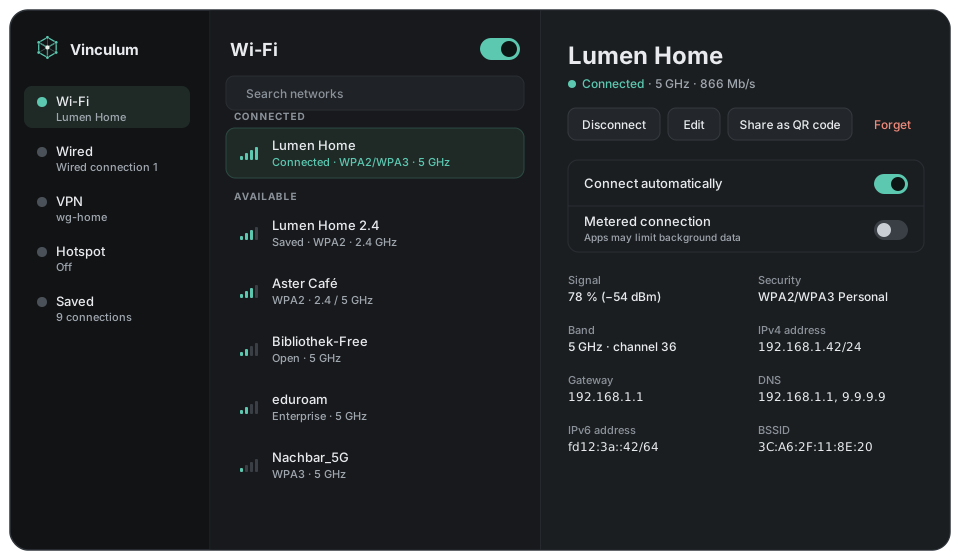
The settings panel GNOME and KDE users take for granted, for the desktops that leave it to you.
Connect in a keystroke
Search, pick, press Enter. Passwords are asked for when needed and kept in your keyring, only for you.
Every setting
Security up to WPA Enterprise, IPv4 and IPv6, DNS, routes, MAC address randomisation, metered, auto-connect priority.
WireGuard built in
Create tunnels, edit peers, or import a .conf. OpenVPN and others show up when their NetworkManager plugin is installed.
Your wallpaper's colours
Reads matugen palettes, ML4W’s included, and recolours itself live when you change wallpaper.
Made for Hyprland
A normal window with the class ch.giosuel.Vinculum for window rules, keyboard-driven, with a tray icon and quick popup.
Leaves your settings alone
Edits change only what you touched, so options from other tools and VPN plugins survive. Works alongside nmcli and nmtui.
All it needs is NetworkManager, which your system most likely runs already.
From the AUR, as a .deb or .rpm, or as an AppImage, for x86-64 and ARM64. See Installing.
Pick a network, type the password once. Vinculum picks up the connections you already have.
Vinculum is free and open source under the AGPL-3.0. Built with Rust and Slint, on top of NetworkManager.